
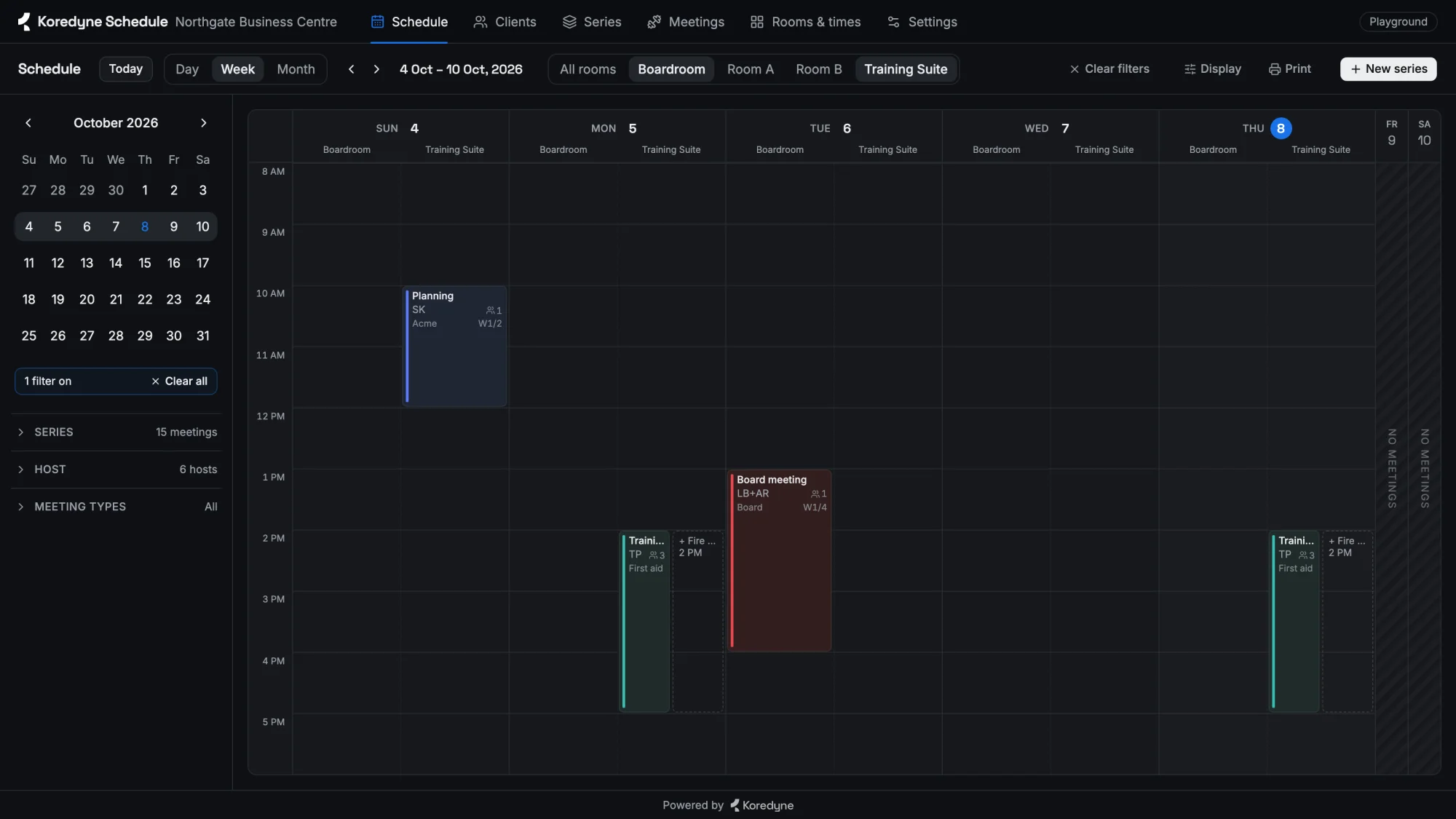
“Every week, every other week, except Thursday.” Anyone who has run a timetable has said a sentence like that. A gym runs boxing every evening and a different grappling class each week. A physio clinic alternates a studio class with a pool session. A business centre hosts a standup every morning, a planning session every other Sunday and a board meeting once every four weeks. Then real life arrives: a practitioner is on leave on Tuesday, a room is being repainted, a public holiday lands on a Wednesday.
We built Koredyne Schedule to handle all of that with one engine. This article is about the decision that made it simple: we never store the calendar. We store the rules and the exceptions to them, never the sessions a rule produces, and work out every date from those.
You can try it while you read: the playground gives every visitor a private copy, so drag, cancel and delete as much as you like.
Two ways to build a timetable
The obvious way is to store every session. When someone creates “Boxing, Sundays at 6 PM”, the system writes a row for each Sunday up to some horizon, and the calendar screen reads those rows.
It works on day one. Then the questions start. How far ahead do you generate, and what keeps adding rows after that? Move the class to 7 PM and you rewrite hundreds of rows, skipping the ones someone already changed by hand. Ask “will anything clash next March?” and you can only answer for the rows you happened to create.
The other way is to store the rule once: “Boxing, Sundays 6–7 PM, in the Ring, week 1 of a 2-week cycle, from 4 October.” When the calendar opens on any week, even two years away, the app works out each day’s sessions. The calendar is real; it’s just drawn from rules instead of read from a table.
That needs three things: a data model that keeps the parts of a timetable apart, a way to compute rotations, and a way to layer exceptions on top.
Separate what, where and when
One line on a timetable mixes several facts. “Boxing with Marco, Ring, Sundays 6 PM, kids, week 1 of 2” is really four:
- Class: what and who. An activity and the people who run it: boxing with Marco, or a board meeting co-hosted by two directors.
- Class time: where and when. A room, a weekday and a time, with an optional label such as “Kids” or “Stage 2”.
- Series: which classes go into which class times, and in which week of its cycle. A series has a start week, an optional end, and a cycle length.
- Plan: how a series is sold. Eight sessions a month, unlimited, or three months for one price.
Two details matter. The week number belongs to the entry, not the class, because the same class can be week 1 in one series and week 3 in another. And plans are separate from series: “one month, 12 classes” and “three months, unlimited” sell the same sessions.
Rotations are arithmetic
A series repeats on a cycle of N weeks. Week 1 is the week it starts, its anchor (always the first day of a week; the API refuses anything else), and it counts on from there. So for any date, finding the week of the cycle is one line of arithmetic:
function cyclePosition(series, date) {
  if (date < series.anchor_date) return null                  // not started yet
  if (series.end_date && date >= series.end_date) return null // already ended
  const weeks = Math.floor(daysBetween(series.anchor_date, date) / 7)
  return (weeks % series.cycle_length) + 1                    // 1-based
}That is the whole rotation engine. A weekly series has a cycle of 1, so every week is week 1. A fortnightly sprint cycle has a cycle of 2: planning in week 1, a retrospective in week 2. A board meeting every four weeks is a 4-week cycle with something only in week 1. Looking at a week next year costs the same as looking at this week: there is nothing to generate, no background job, and nothing to go stale.
Ending, and handing over. A series’ end date is exclusive: it is the first week the series no longer runs. That lets one series end on the same Sunday the next one starts, with no gap and no overlap. A four-week first-aid course hands its room and times to a fire-safety course; a six-week post-natal programme hands over to Stage 2. Both stay in the data, so last month still shows the first-aid course, not its successor.
Two details keep this honest. Dates and times are stored as plain strings (2026-10-04, 18:00) with no time zone: a business is in one place, so “Sunday 6 PM” stays 6 PM across a daylight-saving change; one spanning time zones would need more. And if you’re wondering about iCalendar’s RRULE: it could describe each class on its own, but not a series as one unit, with different classes in different weeks of one cycle sharing rooms and people. Exporting to it would be straightforward if anyone needs it.
Exceptions are a layer, not an edit
Rules describe the normal week; real weeks rarely are. So to work out a single date, the engine runs four steps:
- Series sessions. Every entry whose series is running, whose cycle week matches and whose class time falls on that weekday.
- That day’s changes. A session can be cancelled, moved to another time, room or date, or run by someone else, for this date only.
- Sessions moved in. A session moved here from another day joins the list.
- One-off bookings. An assessment, an interview or a private lesson: a single dated session outside any series.
The important choice is what a change is attached to. We key it by date, class time and class, not by series. The same Monday evening BJJ class sits in “BJJ Gi”, “BJJ Unlimited” and “All Access”, but it is one real class in one room, so cancelling it must cancel it for everyone. That key gives us this for free.
Changes also clean up after themselves: each is stored as a difference from the original, so dragging a class to 7 PM and back leaves nothing behind.
Clashes, and knowing when to stop checking
The rules themselves are simple. A room can’t hold two things at once, and the person running a session can’t be in two places. Back-to-back is fine: one session ends at 5:00, the next starts at 5:00. A room’s cleaning buffer counts; cancelled sessions don’t. Two series that include the same class in the same class time aren’t a clash either: that’s one shared session.
The hard question is how far ahead to check. A change made today might only clash in week 7, when two rotations happen to line up. Because we compute dates instead of storing them, there are no rows to scan. But rotations are periodic, and that gives an exact answer: once the last dated thing has passed (a series start or end, a one-off, a moved session), the whole pattern repeats every LCM (least common multiple) of the cycle lengths. Check that far, and you have seen every combination that will ever happen.
// After the last dated thing, everything repeats every lcm(cycles) weeks.
function conflictHorizon(state, today) {
  let last = weekStart(today)
  let lcm = 1
  for (const s of state.series) {
    last = latest(last, s.anchor_date, s.end_date)
    lcm = (lcm * s.cycle_length) / gcd(lcm, s.cycle_length)
  }
  for (const d of datedExceptions(state)) last = latest(last, d) // one-offs, moves
  const weeks = weeksBetween(weekStart(today), last) + Math.min(lcm, 104)
  return Math.min(weeks, 208) // two caps: two years of repeats, four years in all
}With cycles of 2 and 4 weeks, that is 4 weeks past the last date; with 3 and 4, it is 12. Real timetables stay small like this, but the repeat window is capped at two years and the whole scan at four (cycles of 3, 5 and 7 weeks already need 105), so an odd mix of cycles can’t stall a save; past those caps the check is no longer exhaustive. Three more decisions make it dependable in practice:
- The server checks inside a transaction. Every save runs, the clash check runs over the whole horizon, and if the save introduced a clash it is rolled back with a message such as “Host Mei Chen double-booked: Standup (Room A, 9 AM – 9:15 AM, Acme — Daily standup W1) & Interview (Room B, 9 AM – 12 PM, Orbit Analytics — Hiring W1), first 6 Oct”. SQLite runs synchronously in one process, so two saves can never interleave.
- Only new clashes block. The check compares clashes before and after the change. If old data already holds a clash, unrelated edits still work, instead of the whole system freezing until someone sorts out March.
- The browser and the server run the same rules. One module is shared by both, so the warning you see before pressing Save comes from the same code the server enforces.
When storing is the right call
Computing dates isn’t free of costs. A question like “every session Adam attends next month” means working out the dates first and filtering after; across thousands of businesses in one database, you’d want a precomputed index. And history must not move: attendance, payroll and invoices refer to sessions that actually happened, so those belong in stored records, written when they happen, not recomputed from today’s rules. Today, editing a series in place rewrites its past weeks too; “replace from a date” ends the old series and starts a new one, and that is what keeps history intact.
So the full version of the rule is: compute the future, store the past. Koredyne Schedule doesn’t track attendance yet, so today it only needs the first half.
One engine, three vocabularies
Nothing above is about gyms. A physio clinic has practitioners, treatment rooms and programmes; a business centre has hosts, meeting rooms and client bookings. The model is identical, so the engine stays the same and only the words change:
| Gym | Clinic | Meeting rooms | |
|---|---|---|---|
| A booking | Class | Session | Meeting |
| Who runs it | Coach | Practitioner | Host |
| What it is | Activity | Service | Meeting type |
| Who books | Member | Patient | Client |
| The repeating set | Package | Programme | Series |
The business picks its kind in Settings, and every screen, plan label and error message follows: “Host Sara double-booked”. We turned down generic words like “resource” and “event”: the people using a timetable are front-desk staff, not engineers. Internally the code keeps one set of names; the vocabulary is a thin layer at the edges.
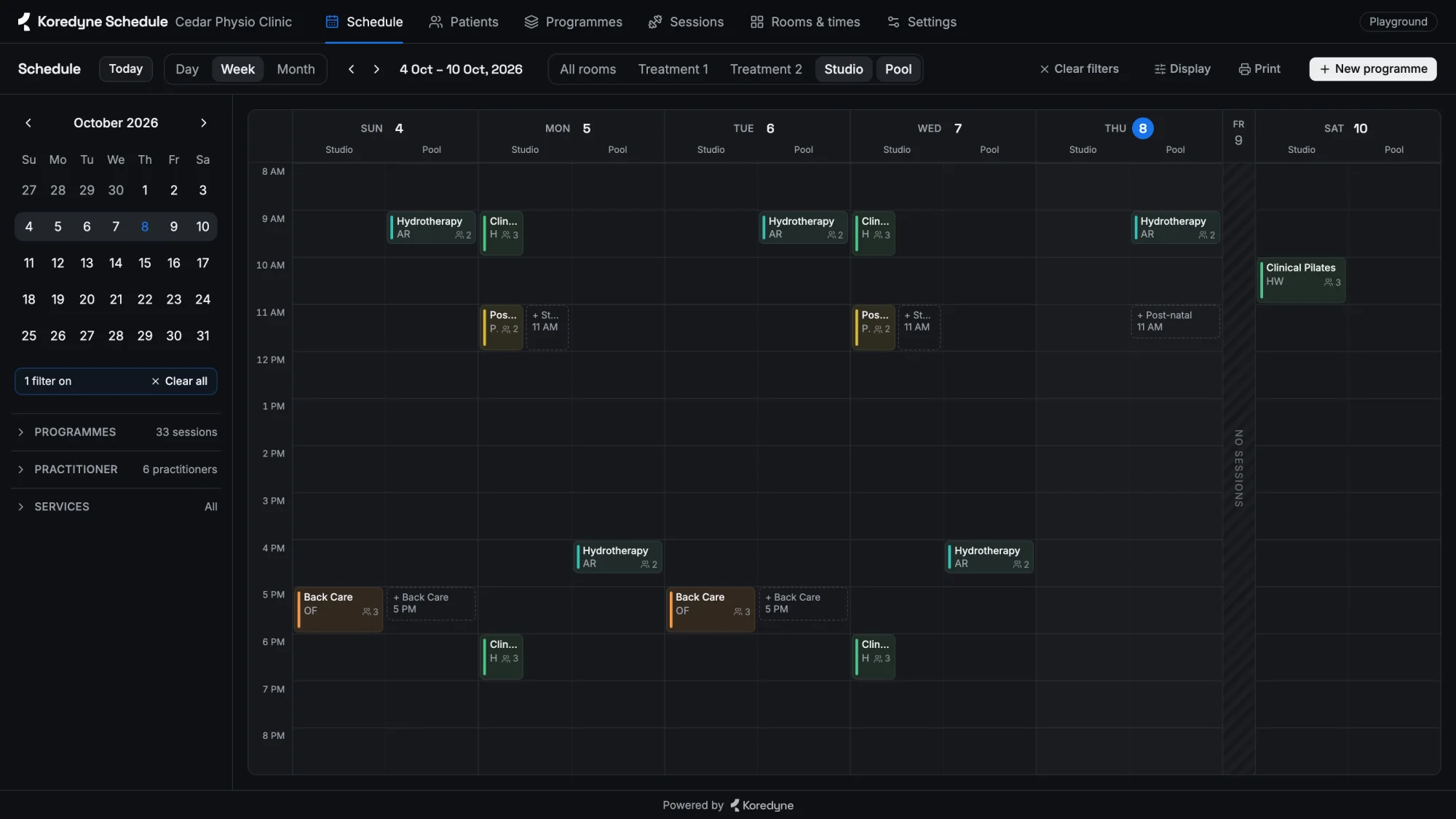
Each kind ships with a demo described as plain data, and a test checks every demo for clashes twelve weeks ahead.
A playground anyone can break
We wanted a public link where anyone could try it properly, deleting everything included. With a shared demo, one visitor’s deletions would spoil everyone else’s tour.
So every visitor gets their own copy: an in-memory SQLite database, loaded with the demo and found again through a random id in a cookie. Copies idle for an hour are dropped, and beyond 200 the least recently used goes first. Each is a few hundred rows, so it costs almost nothing; a restart wipes them all, which for a demo is a feature.
handle(req, res) {
  let id = readCookie(req, 'sandbox')
  let box = id && boxes.get(id)
  if (!box) {
    id = crypto.randomUUID()
    if (boxes.size >= MAX) drop(leastRecentlyUsed())
    const db = openDb(':memory:')        // a fresh database starts with the demo
    box = { db, api: apiMiddleware(db) }
    setCookie(res, 'sandbox', id)
  }
  markUsed(id, box)
  return box.api(req, res)
}Small on purpose
The whole system is one Node process with the built-in node:sqlite, a React front end, and one shared rules module. Every write returns the complete state (a business’s timetable is a few hundred rows), so there is no cache to invalidate and no partial update to reconcile. On a laptop (Apple M4, Node 24), the gym demo’s 109 class times take about 1 ms for a week, about 90 ms for a whole year (some 11,800 sessions), and about 5 ms for the clash check, which runs twice on every save (before and after). Clashes are compared pairwise within each day, which is fine at a few dozen sessions a day; there is nothing to optimise yet.
Next is mostly about people rather than dates: roles, attendance, closing for a date range, and pausing a rotation over a closed week.
Try it
Open the playground, switch between the gym, clinic and meeting-room demos in Settings, and try to break it: drag a session onto someone who is already busy and watch it refuse. The code is on GitHub. And if your business runs on a timetable that repeats, rotates and gets interrupted, we’d like to hear about it.